HoldStrong picks up a pencil
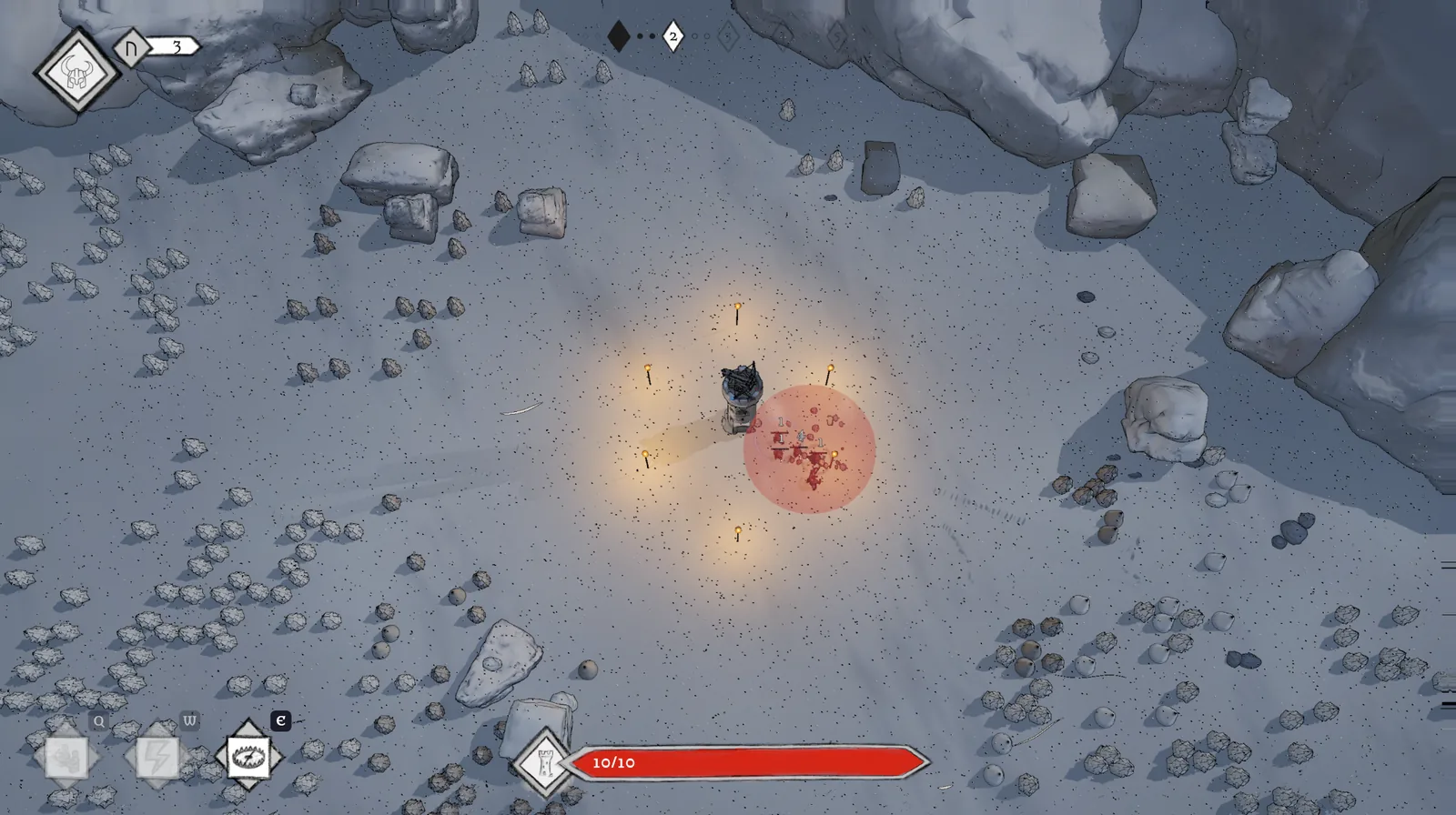
If you saw the screenshots in the post about the demo date, you will hardly recognise the game in the picture above. That is not because something big happened to the gameplay. It is because between 20 and 22 October almost everything you look at while playing got a new face. The HUD and the menus are now drawn by hand in pencil, the skill tree in the night sky uses the same drawings, and the 3D world itself has a thin outline around every figure, every rock and every tree.
This post is about that change of look. I will show what the game looked like a week ago, what replaced it, the way I went first and then turned back from, and the small bugs a new look always seems to drag in with it. And, as always, there is a list of what is still a placeholder.
What it looked like a week ago
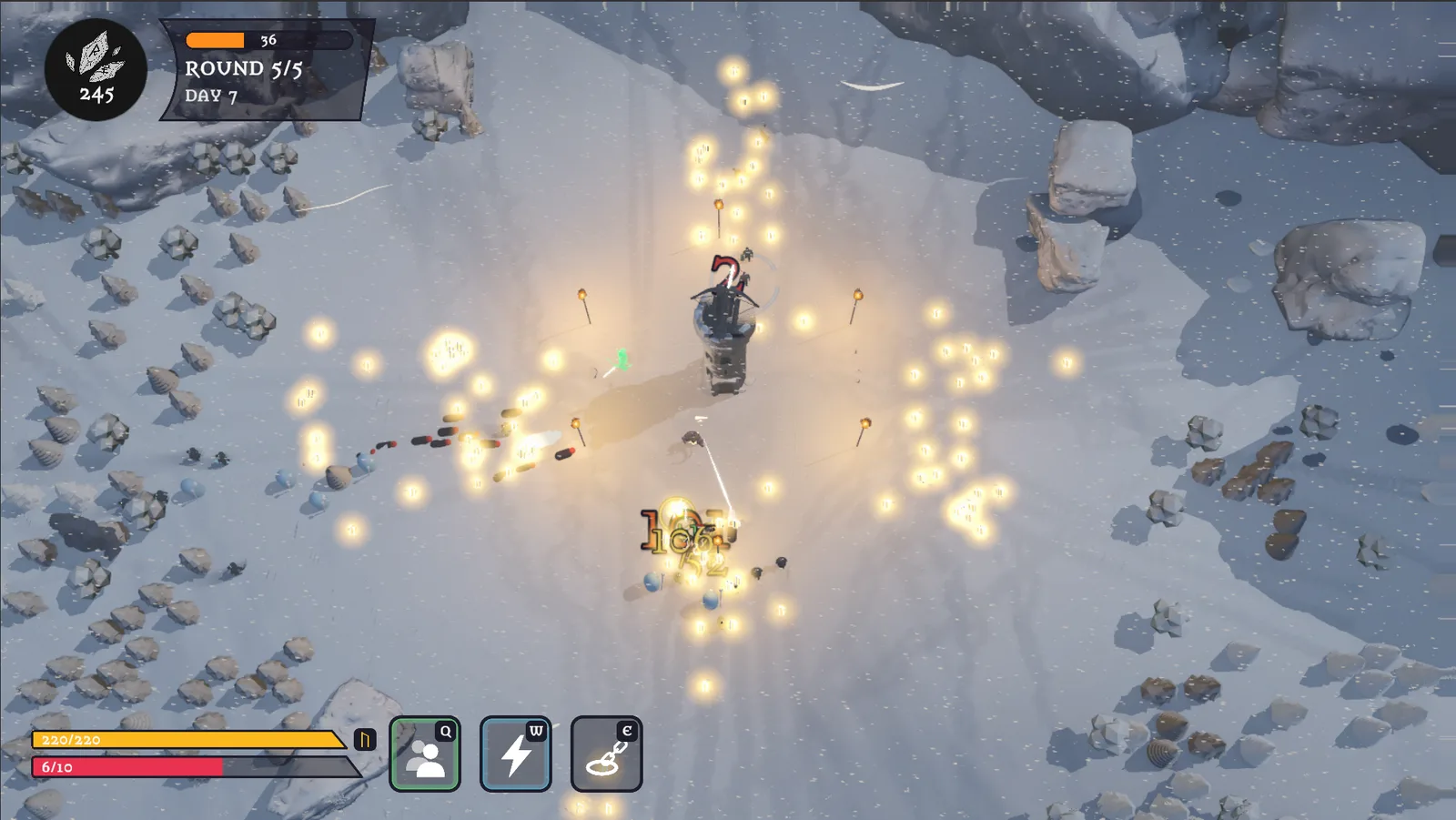
This is the same game in mid-October. Everything you need is there: the currency in a black circle at the top left, a panel with the round and the day next to it, two coloured bars at the bottom left, and three square boxes for the abilities of the gods.
None of it was wrong, and all of it did its job. But every element had been made at a different time for a different reason, and you could see that. The circle, the panel, the bars and the boxes did not share a shape, a line or a colour. The result was a HUD that looked like a prototype, sitting on top of a scene that was slowly starting to look like a game.
I love drawing with a pencil. As a child I discovered my passion for drawing with a pencil in my hand, and I still prefer it today. So it was not much of a leap to carry that look over into my first game.
One shape for everything
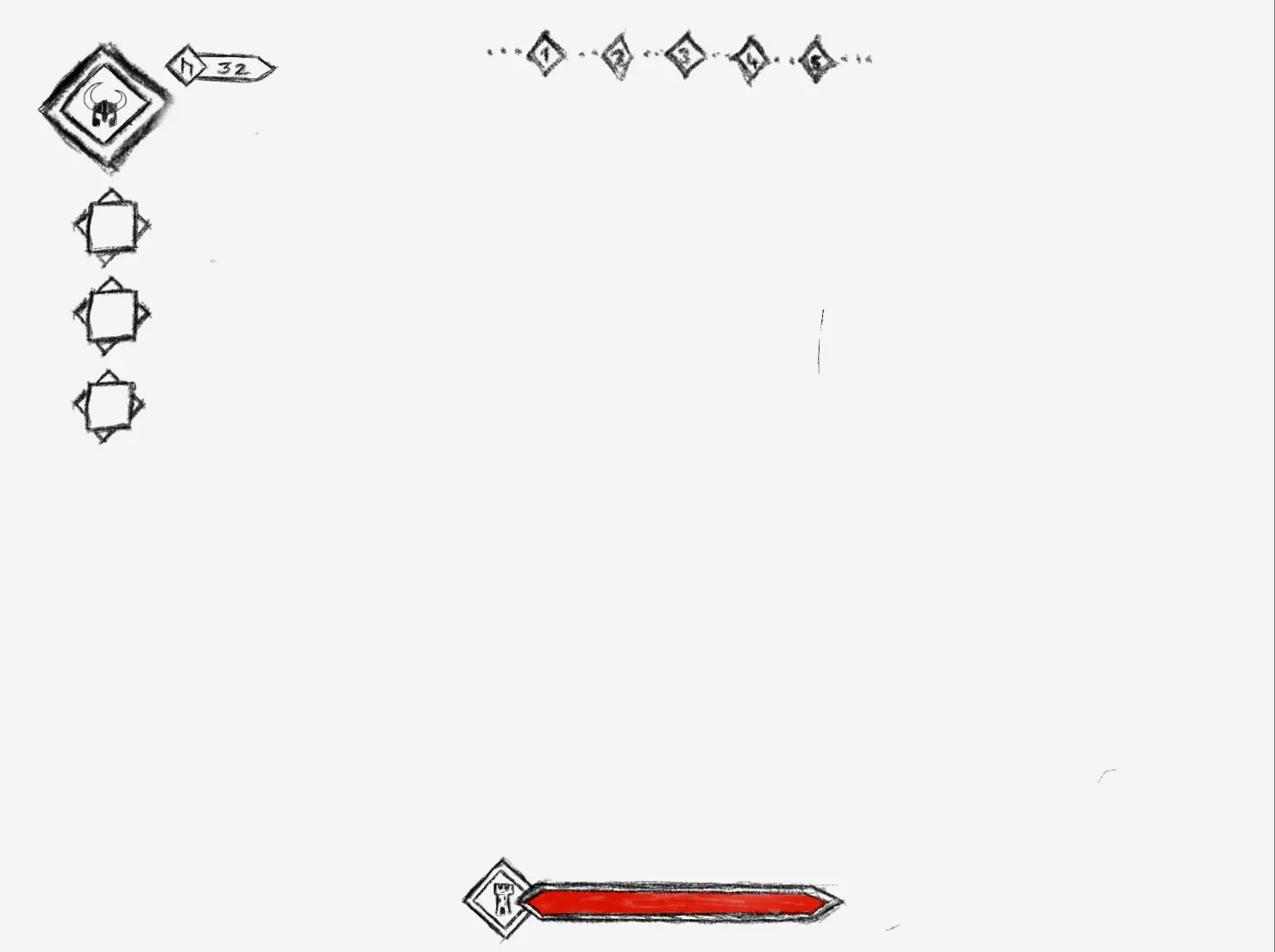
The new HUD is built from one single shape: a diamond with a double pencil line. Once I had that shape, every other element could grow out of it. Above you can see my draft for it, as I drew it before any of it was in the game. In the draft the slots still hang down the left edge, while in the game they now sit side by side at the bottom left.
- The portrait. At the top left there is now the helmet of the Einheri, the nameless Viking you play, inside a diamond. Next to it hangs a small drawn plaque with your currency, and the currency has a symbol for the first time: the rune ᚢ, Uruz. When you kill an enemy, the reward now floats up as “+1 ᚢ” in small black letters, so it no longer competes with the damage numbers.
- The round track. The old text “Round 5/5, Day 7” is gone. In its place a row of diamonds and dots runs across the top of the screen. Every diamond is the start of a round, the first dot fills at half of the wave, and the second when the round is done. Rounds still to come are faint outlines, the current one pulses gently, and finished ones turn to graphite.
- The tower’s health. At the bottom centre the tower’s health bar is now a drawn bar with a small tower emblem at its tip. When the tower takes a hit, the emblem jumps and shakes for a moment, and when you earn currency, the rune diamond at the top pops in the same way.
- The ability slots. The three gods sit at the bottom left in a diamond each, with a square for the icon inside. When you press a key, only the inner square squashes, while the drawn frame around it stays still. Since the gods now work with cooldowns instead of a shared energy pool, the slots also show how many seconds are left.
I like that last detail a great deal: because only the inside moves, the frame feels like paper and the icon like something you are actually pressing.
The sky gets the same pencil
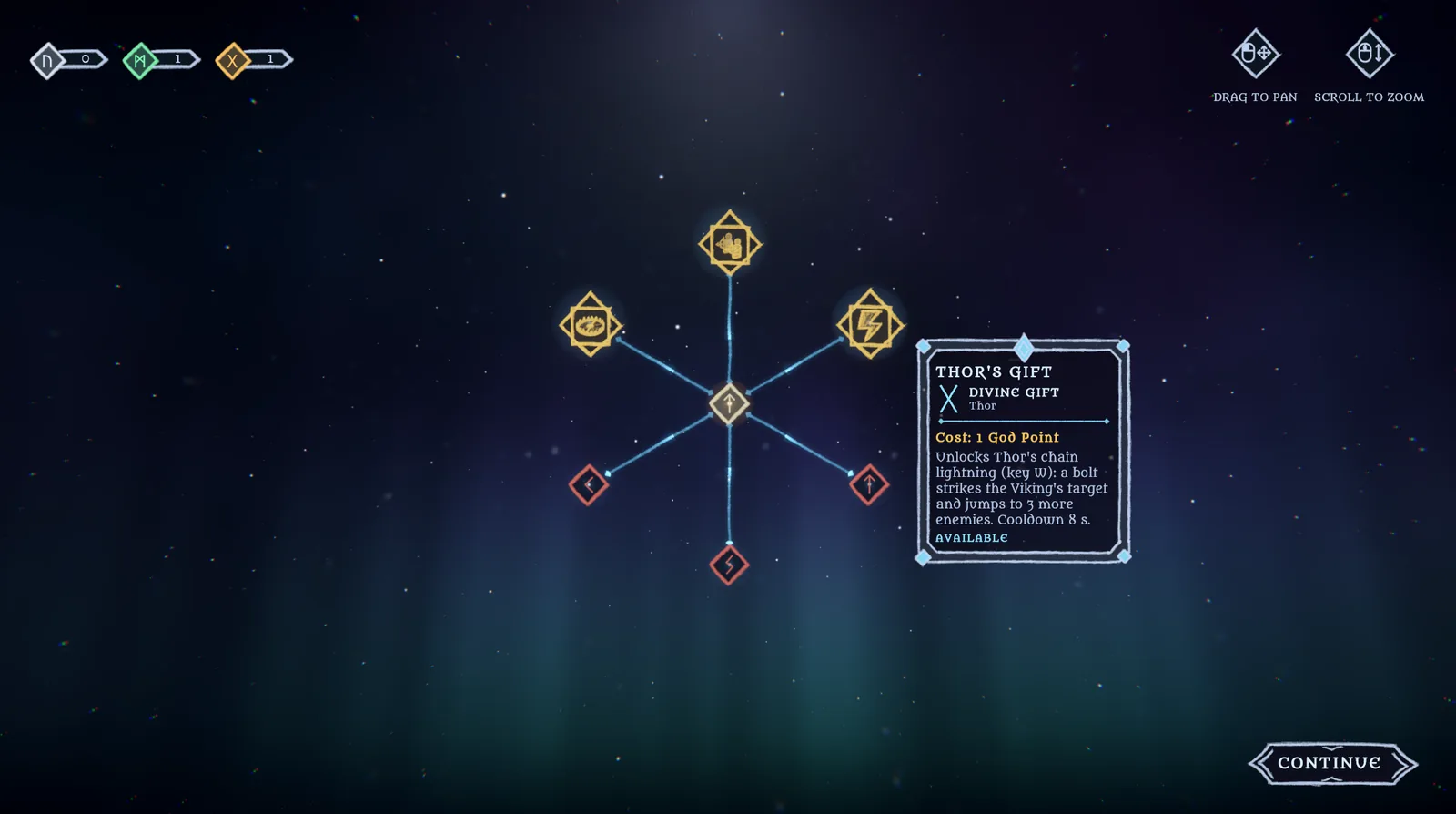
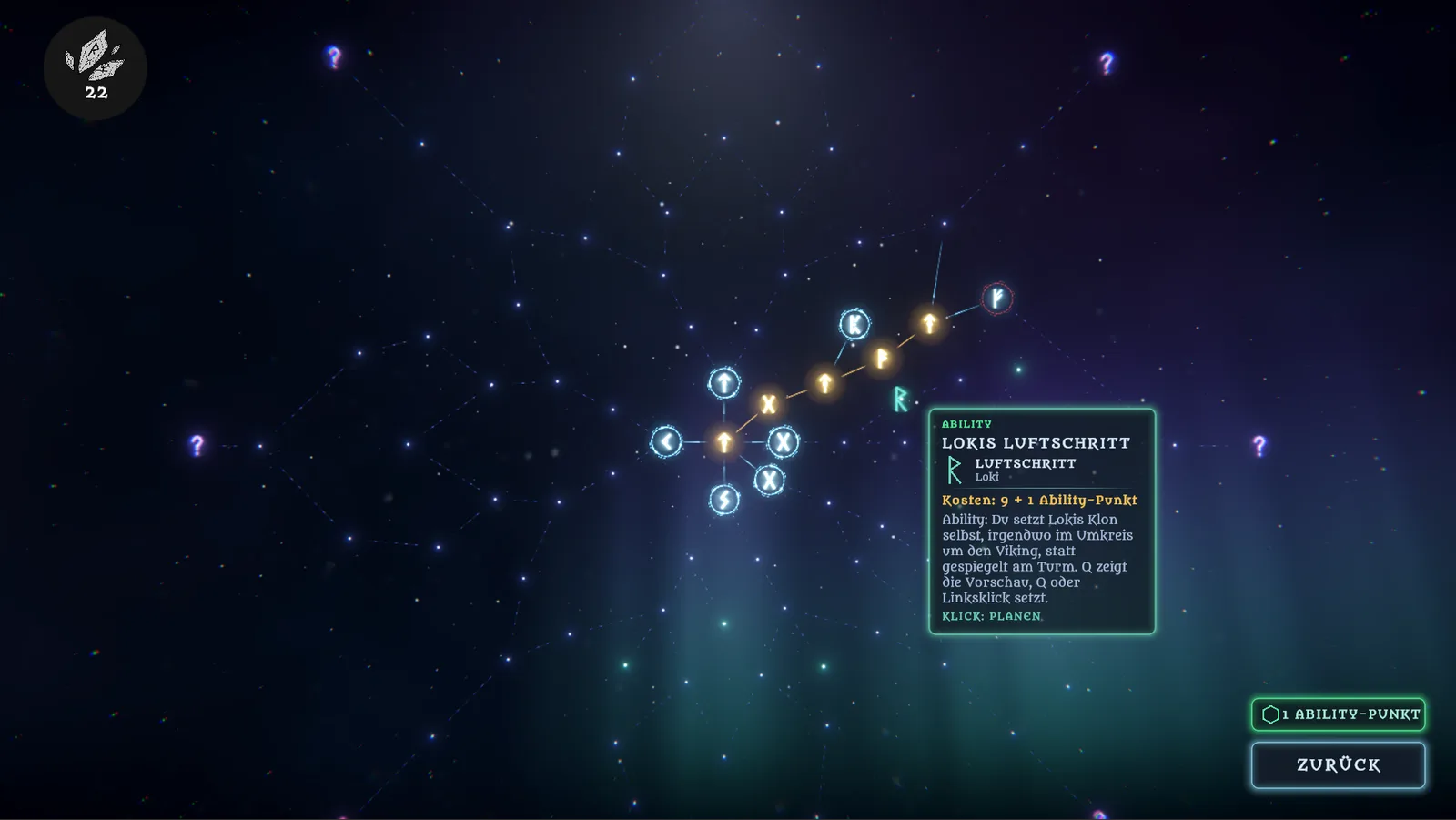
When you buy an upgrade in HoldStrong, the camera tilts up from the battlefield into the night sky, where every upgrade is a star. Until last week those stars were glowing rune circles joined by thin straight lines. You can still see that version in the demo post.
Now the stars use the same diamonds as the HUD. A normal upgrade is a small diamond, and an ability or a gift from a god is a larger one with the square inside, exactly like the slots at the bottom of the screen. The colour tells you what kind of star it is: ice blue for a plain improvement, green for an ability and gold for a god. The lines between them are no longer straight either. Each one is a pencil stroke with a slightly wavy centre, a width that changes along the way and frayed edges, and every line is a little different from the next.
The description of a star now opens in a drawn frame with corner diamonds and a small ornament on top, and for upgrades that change a number, it shows the value before and after you buy it. The layout of the tree itself changed in the same week, but that is a story for its own post.
A detour over paper
The night-blue sky you saw above was not my first attempt. When I moved the drawings into the sky, I first took them literally. The diamonds had a white paper fill, the runes were drawn in graphite, and the popup turned into a sheet of white paper with dark grey text. It was supposed to look like a sketchbook lying over the stars.
There is no screenshot of that version, because two days later I took all of it out again. A white sheet in the middle of a dark sky simply shouted louder than anything else on the screen, and the stars lost exactly what made them stars. So now the fills are night blue, the lines and the text are light, and the pencil only shows in the strokes themselves. Looking back, the paper version was a useful mistake, because it showed me that the pencil look lives in the lines and not in the background.
The menus follow
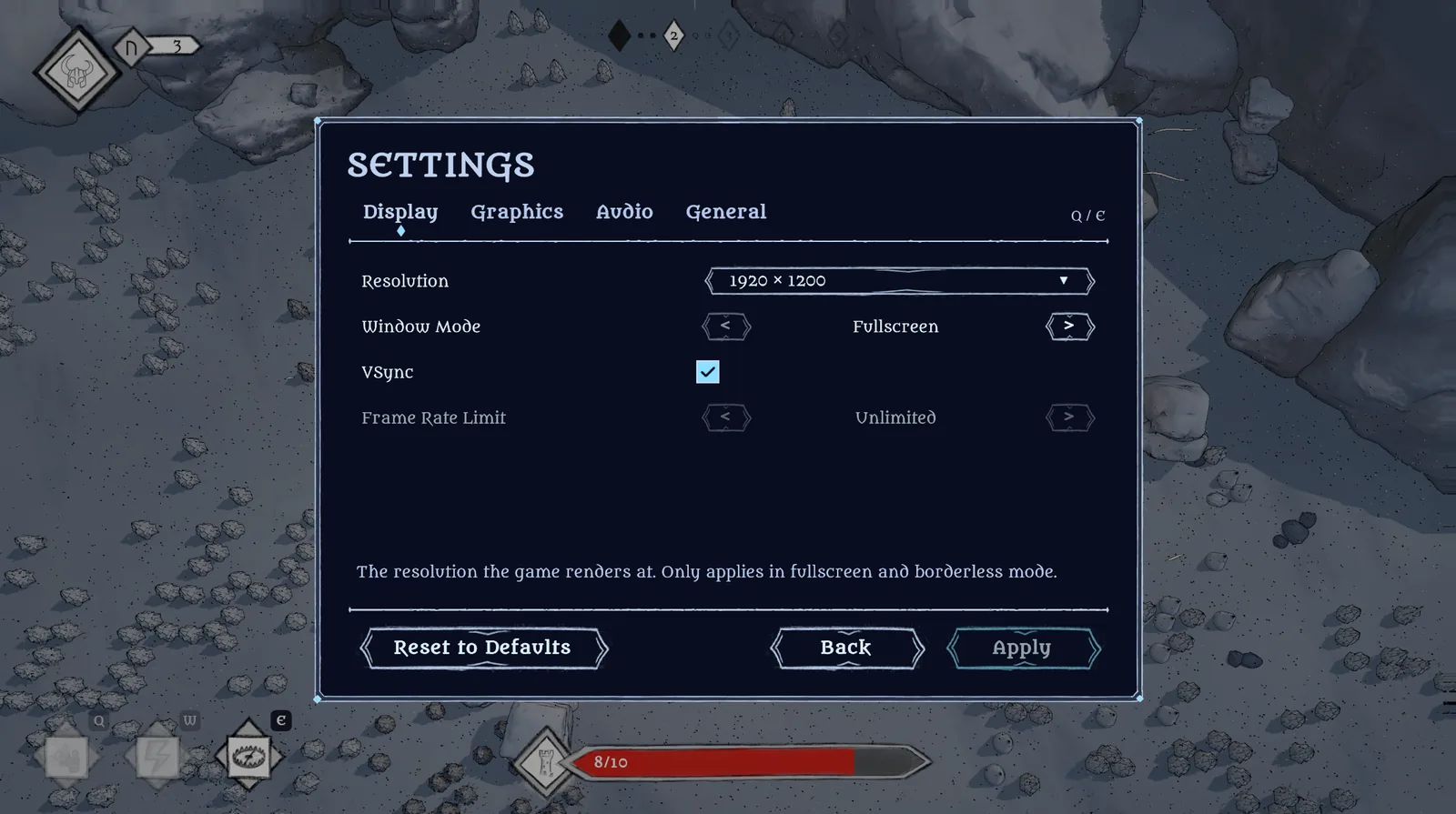
Once the HUD and the sky were drawn, the menus looked out of place, so they followed. The settings, the pause screen, the end of a run and the War Council, the overview you open with Tab, now all share the sky colours and the same drawn frame. Every button is a hand-drawn shape with pointed ends that changes its drawing when you hover over it and sinks in a little when you click. Straight dividing lines became pencil strokes with a diamond at each end, and an opened dropdown marks your choice with a small diamond from the round track instead of a check mark.
None of this changes how the game plays. But it is the first time that every screen, from the main menu to the last round of a day, feels like it belongs to the same game.
The world gets an outline
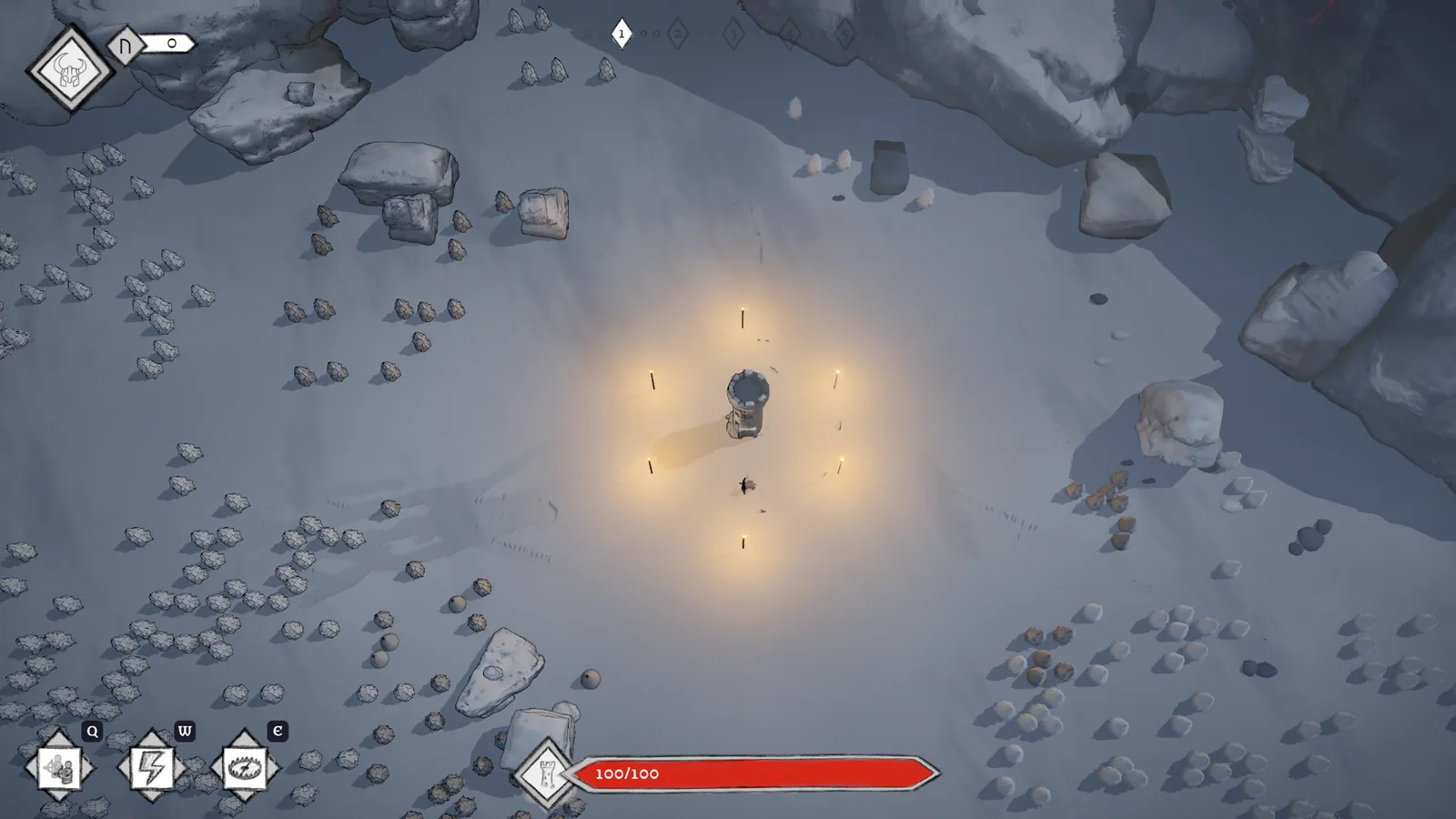
A drawn HUD on top of a 3D world that looks perfectly smooth creates a strange gap. That is why I also added a toon shader to the game this week. In practice, it draws a thin dark line wherever a surface turns away from the camera. Above you can see the battlefield without that line, and at the very top of this post with it. So every figure, every rock and every tree now gets an outline, and the whole scene looks a little like a drawn comic panel without losing its 3D depth. I deliberately kept the line thin, because it should hold the picture together and not turn it into a cartoon.
I tried to go one step further on the same day and gave the snow-covered trees the toon shader’s flat shading as well. I took that back the same day, because the trees fell out of the design and no longer fit the picture. So the trees keep their own snow material and get the same outline as everything else.
In the same go I moved the gameplay camera up to almost three times its old height, so you now see much more of the battlefield around the tower. To keep that larger view from looking empty, the forest got more than a hundred new trees, a few more rocks, and the snowflakes became bigger and fall closer to the camera. You can see all of that in the picture at the top of this post.
Getting pencil into the engine
The drawings start in Procreate on the iPad. I use it because its layers let me keep outline, fill and background apart from the start, and the game needs exactly those as separate pieces. Then they go into Unity, the engine HoldStrong is built in. Getting a pencil line from one to the other without it turning muddy took three small decisions.
First, everything is drawn at twice the size it is shown at. A pencil line has fine grain and uneven edges, and at its real size those details are the first thing to disappear. That is why the engine checks the import settings of every drawing automatically, so I cannot forget them on a single file.
Second, the colours. The part of Unity that draws my menus can only darken an image by a colour, not tint a white line light blue on a dark background. So for the menus a small script bakes the colours straight into the drawings. When I change a colour, I run the script again instead of drawing anything twice.
Third, the buttons have to stretch to different widths without their pointed ends stretching too. For that each drawing is cut into nine pieces, the corners stay fixed, and only the middle grows.
Three bugs the new look brought with it
New looks rarely arrive alone, and these three were waiting for me.
A grey box behind every button. After the switch, a grey rectangle showed up behind every drawn button as soon as you hovered over it. The cause was the engine’s default menu style, which colours buttons on hover with more specific rules than mine. So my “keep the background transparent” lost against the default every time. The fix was to write my rules just as specifically.
A health bar that wandered off. The first time the tower took a hit, its health bar jumped a little to the left and stayed there. The pop animation remembered the bar’s resting position when the game started, but at that moment the screen layout was not finished yet, so it remembered the wrong spot. Now it notes the resting position at the start of every pop instead.
Bought stars that looked unbought. In the sky, a star you had already bought looked exactly like one you could buy as soon as you closed and reopened the tree. The gold of a bought star had only come from its glow, and that glow only shows while you hover over it or right after the purchase. Now the diamond of a bought star carries the gold itself.
What is still a placeholder
So that this post does not promise more than it shows, here is what is still provisional as of today:
- The mouse icons in the sky. The hints for “drag to pan” and “scroll to zoom” use two quick pencil-style icons until hand-drawn ones replace them.
- The “Unknown Gift”. Thor and Týr each have an empty slot in the tree for a gift that does not exist yet.
- Icons for the stars. At the moment most stars only show a rune. That looks good, but you have to open a star to know what it does. So the stars in the sky will very likely get small icons as well, to make the tree easier to read at a glance.
- The values. Colours, sizes and spacing are a first pass, and some of them will change once more people have played with them.
To sum it up: as of late October, everything you look at while playing HoldStrong is drawn in the same hand, from the HUD over the sky to the menus, and the 3D world has the outline to match. The demo on 15 November will look like this.
If something in the new look does not work for you, or you liked the glowing runes better, tell me on my Discord. I would rather hear it now than after the demo.